
Showing posts with label iPad App. Show all posts
Showing posts with label iPad App. Show all posts
Monday, 3 February 2014
Children enjoy brushing up on their word skills with the Ladybird "I'm ready to Spell" app (iPad version tested)
Labels:
iPad App,
Ladybird I'm Ready to Spell,
Spelling
 |
| Ladybird's fantastic wordplay app "I'm Ready to Spell" - Building a bridge with words |
Charlotte's weekly spelling tests from school just got a little easier - thanks to a new iPhone / iPad app from Ladybird (it's also available for Android tablets and colour Nook tablets too).
We took the iPad version for a test drive. Ladybird Apps are fantastic quality, and cover a range of subjects from learning to read to trying out phonics.
In Year 1, Charlotte's weekly spelling tests usually involve us digging out a piece of paper, reading the words to her and letting her write them down.
Thanks to the games and fun in "I'm ready to Spell" we can enhance the game's already extensive dictionary of words by adding our own.
Each game features a cool little spacegoing kitty, mixing different word games together like the one pictured above - speed spelling. Children can take things at their own pace or race against the clock to win stars as they play.
Check out the trailer for the app below. Ladybird "I'm Ready to Spell" costs just £1.49 from the app store.

Sunday, 22 December 2013
Booky Advent Calendar Day 22 - 22nd December 2013: "Angel's Great Escape" (iPad Interactive Story) by And So We Begin

Booky Advent Calendar Day 22
Angel's Great Escape
Angel's Great Escape
Written by Kirstie Rowson
Published by And So We Begin
Who is that rather beautiful angel? Well she's the shining star of a wonderful app that we enjoyed immensely last year, and is still available on the app store.
"Angel's Great Escape" is a fantastic story narrated by none other than Alan Titchmarsh who loans his dulcet tones to a fine christmas story.
Please also stop by and visit the And So We Begin website for more news.
Here's a video of the app in action. How brilliant does this look? THIS brilliant!!!
Angel's Great Escape (on iTunes)
(On Google Play)
Visit the And So We Begin Website
Charlotte's best bit: Lots of shiny sparkly goodies to prod and play with in the story pages
Daddy's Favourite bit: Definitely one of the best Christmas story apps.
(Very kindly sent to us by And So We Begin)
Tuesday, 22 October 2013
The Frog Prince (iFairyTale) from Blue Ocean Studios (Version tested: iPad)
Labels:
Blue Ocean Studios,
IFairy Tales,
iPad App,
The Frog Prince

The Frog Prince
iFairy Tales
Version Tested: iPad
Published by Blue Ocean Studios
We're always on the lookout for a new wrinkle when it comes to classic fairy tales. Blue Ocean Studios have begun producing some high quality "i-Fairytales" starting with the Brothers Grimm classic story "The Frog Prince".
The story begins as a young princess is playing with her favourite golden ball in the garden. The ball is lost in a pond, and the princess pines for it - until she strikes a deal with a slimy pond-dwelling frog to retrieve her beloved toy, in exchange for allowing him to share her table - and sleep on her bed! Eeek!
The frog follows the princess's wishes, returns her ball but she rather rudely runs off, leaving the frog far behind.
Frogs are tenacious little critters though, and it's not long before there's a loud knock at the castle gates as the princess is enjoying her dinner. It's none other than the frog who expects the princess to make good on her deal, and at her father's behest, she has no choice but to give the croaking (and rather annoying) house guest house room.
In this retelling (with us trying out the story on the iPad version), each scene is animated and children have the opportunity to have the story read to them - or they can read it aloud themselves.
Animated scenes are of a high quality, and there's a song at the end that Charlotte demanded on a loop - setting the scene for more i-Fairy tales to come.
You can find the app on the iTunes Store via this link, priced at £1.99:
https://itunes.apple.com/gb/app/i-fairytales/id718022950?mt=8
Charlotte's best bit: The Fairy Song at the end of the app, and the Princess's rather beautiful blue dresses
Daddy's Favourite bit: Easy to navigate, high production values, overall a very slick version of a well loved children's classic
(Kindly sent to us for review by Katy at Quad Digital)
Tuesday, 8 October 2013
Sock Monster by Lorna Freytag (Story App by Junoberry - iPad version tested)
Labels:
iPad App,
Junoberry,
Lorna Freytag,
Sock Monster

Sock Monster
Written and Illustrated by
Lorna Freytag
Published by Junoberry
Just who IS that devilishly cute little toothy monster who loves nothing better than dining on our socks? Well he's Sock Monster, and he's the star of a new app (and also a print book - hooray!) from Lorna Freytag. If you've missed Lorna's sumptuous and luxurious illustrative work for books like "The Wonderful Wizard of Oz" and the utterly sublime "Wild Child" - which we STILL haven't managed to snag a copy of yet - then you've definitely missed out.
Sock Monster is her latest creation and he's absolutely crazy about socks. Fat fluffy woolly ones, thin stripey sporty ones, ankle socks, walking socks, socks with tassels - you name it, Sock Monster will probably munch on it (though he draws the line at stinky socks, they only give him tummy ache - poor thing!)
But what if all the socks disappear? What can be done? Is there any way that Sock Monster can be saved?
Thankfully Sock Monster's loving owner knows just where to dig up a gigantic pile of socks that will keep Sock Monster munching all day long.
This interactive story app is fabulously presented, easy to navigate (with self read or 'read to me' options, voiced over in a lovely lilting accent). Children will love triggering all the little animations and funny Sock Monster bits (Charlotte got quite obsessive about the washing machine - "WAIT till the lights go on, Daddy! WAIT!")
 |
| Sock it to me, baby! |
Sock Monster is available now from iTunes.
Charlotte's best bit: Freshly washed socks from the washing machine taste divine!
Daddy's Favourite bit: A lovely and cute little app, loved Sock Monster's frantic excited wagging tail!
(Kindly sent to us for review by Lorna at Junoberry)
Thursday, 15 August 2013
Jetpack Journeys (App Review) by Playcloud / Inkology (Version reviewed - iPad) #ReadItMD13 Theme Week - "Space"
Labels:
Inkology,
iPad App,
Jetpack Journeys,
PlayCloud

This week on ReadItDaddy as part of our #ReadItMD13 Theme Week celebrating Space Exploration we've looked at various books that broach the subject in brilliant ways for young children to understand.
On the app side of things, it's actually quite difficult to source decent space-faring apps that appeal to children around Charlotte's age. Some are quite wordy, and go into great technical detail (fine if your child can read and explore on their own but not great if your child is just learning to read and finds some words and terms quite difficult).
Step forward Jetpack Journeys, a fun game that mixes together engaging gameplay and presentation with a goodly dose of facts about our solar system and the planets therein.
Dom Conlon, part of the team at Playcloud, came up with the idea of an app that would appeal to his own young son.
"I love space and I love chatting to my son about it. When I first started talking to him about little facts (like that it takes light 8 minutes to get from the Sun to the Earth but that before that it has to bounce around for 30,000 years to actually get to the surface!) I was looking for cool facts. Everything seemed just slightly too old and there were no CBEEBIES level of fun to things."
Jetpack Journeys eschews text-heavy scientific explanations for good old fashioned intuitive gameplay encouraging creativity, building and exploration.
 |
| O-Boy embarks on a journey around the red planet, Mars in "Jetpack Journeys" |
Your young rocketeers pick their favourite hero from a selection (you can see O-Boy, Pippa, Izzie and Barney in our header) and then jet off on their first mission, picking a planet to explore and navigating there in their spaceship. As each mission passes, children get the chance to build their own spaceship, strapping engines, crew compartments and nosecones together to come up with wild and wonderful designs using a pool of spacey-looking components (we loved the tintoy robot one!)
 |
| Building the perfect spacecraft in "Jetpack Journeys". Love the nod to Blakes 7 :) |
When landing on a planet, things get slightly more precarious as you have to navigate your spacefaring explorer around the planet's surface, collecting all the bits of your broken rocket before blast-off.
There are shades of the classic game "Jetpac" in here for old-school retro gamers like myself, though the game neatly does away with any laser-blasting silliness or alien destruction in favour of offering exploration and fun over mindless shooting.
Production wise, the game feels nicely put together (Loved the "Button Moon-esque" theme tune when the app starts up). There are times when I think the game could've explained its own interface a little better (children don't always intuitively pick up on GUI things that seasoned gamers and adults may find 'natural') but with a grown-up around to guide them around any potential sticking points, there's hours of fun to be had with Jetpack Journeys for young gamers just cutting their teeth with phone and tablet games.
If your children are interested in space, love the idea of exploring our solar system with a great little character in tow, and can't wait to build their own spaceships, let them blast out into the stratosphere with Jetpack Journeys.
If the app has given you an appetite to explore more in the Jetpack Journeys universe, download the free Jetpack Journeys Magazine and visit the Jetpack Journeys Website.
Charlotte's best bit: The Spaceship Constructor. A great little mini-game in its own right.
Daddy's favourite bit: A fun and neat little exploration and action game, and a great way to set your kids on the path to discovering the magic of space.
Wednesday, 26 June 2013
Night Zookeeper - Teleporting Torch (Interactive App) by Wonky Star
 |
| What happens at the Zoo when darkness falls? Call the Night Zookeeper! |
"Night Zookeeper - Teleporting Torch" isn't your ordinary everyday drawing app. In fact some parents might actually fall at the first hurdle - as we nearly did - as Night Zookeeper asks you to register an email address as part of the app's interactive features and the unique way it works.
Panic ye not though, if you're already familiar with the concepts behind "DrawSomething" by OMGPOP, you'll be OK with this. You use an email address (your email address) to register, and then you can put in a child's name or nickname as a Zookeeper name - so that they can begin to play with the app and download daily special missions to earn their Zookeeper stripes.
Largely these take the form of mini drawing challenges. For instance, your child might be asked to draw what happens when a wonky shelf full of paint falls on one of the zoo animals (Aiieee!) or perhaps even draw a picture of a holiday destination they've always wanted to visit.
New challenges become available daily, and these are downloaded to your iPad through the app. Once children have completed a drawing, they can add a bit of explanatory text to explain what's going on.
And here's the first problem - but one that could potentially be easily solved with a patch. The app uses the standard iPad apple keyboard for text input, which is great if your children are old enough to know their uppercase (capital) letters but not so great if your child is Charlotte's age, and has been brought up only recognising lower case letters. Some apps neatly get around this by re-mapping the standard keyboard input to something a bit more phonics-friendly but this isn't the case with the Night Zookeeper app.
Luckily with a helping hand from me, and a bit of patience, Charlotte soon got her head around leaving little notes to accompany her drawings.
Actually on the subject of the drawing interface, here's the potential second problem. The drawing interface tool bars appear / disappear as your child touches the screen - they're not constantly switched on (probably to save a bit of drawing space around the edges perhaps?) This is massively distracting and means that children get a little frustrated with the tool / colour selection. In fact it was such an annoyance to Charlotte that she mainly stuck with one colour, one tool while drawing and didn't want to change. A static tool bar set and palettes would've been better for us but I'd be interested to know if any other folk had the same issue.
It's a cool idea though, so please don't let our little niggles put you off. Basically this is an app with a huge amount of creative potential, that will perhaps break your children out of the mould of just drawing the same old things every time they sit down for a bit of iPad finger painting.
Night Zookeeper - Teleporting Torch is available from iTunes, priced £1.99
https://itunes.apple.com/gb/app/night-zookeeper-teleporting/id654094476?mt=8
You can also pick up Night Zookeeper - Drawing Torch for free via the following link:
https://itunes.apple.com/gb/app/night-zookeeper-drawing-torch/id573502313?mt=8
Find out more about the apps at the Night Zookeeper Website
Monday, 24 June 2013
Write to Read (iPad App) by WriteReader AP
 |
| Write to Read is Easy, intuitive and can help your child to learn to read through writing! |
It sounds completely crazy, trying to run before you can walk, but we took a look at the app after we were given the opportunity to review it - and it's actually a really interesting idea.
Basically, any app that allows a child to 'own' it by putting their own stamp on it is a very good idea as far as we're concerned (I feel like I've been banging on for years about user-generated content in apps and games being a real 'hook' to keep children and adults interested). Here in Write to Read, the basic steps of using this intuitive app are:
- Children create their own 'book', choosing a name for the book and a cover picture (which they can use the iPad camera to take, or use an existing image from the iPad photo library)
- Children can then add pages, again with a photo (or even a snapshot of a child's own drawings) and some accompanying text that the child types themselves.
- Adults can then make a comment underneath the child's typed text to correct any mistakes in the sentence - so the child can refer back to them and learn what they got right and what they got wrong.
So basically it's a 'framework' for a whole new way of learning, that has the added bonus of getting children used to keyboard skills - which is a real boon in today's computer-dominated world.
Charlotte needed some help navigating around the app, and help to get things set up initially. But like most 5 year olds, she's extremely sharp and tech-savvy when it comes to most apps so she could get on and start using the app as intended.
It's quite nice to let children loose on the app and see what they come up with on their own (Charlotte's school does actually use a fairly similar method of letting children write a sentence in their own way rather than the right way, and then showing them where they went wrong if necessary - as a means to back up the way a child hears and interprets words and sounds so the app was a great fit for us!)
The only extra feature I'd suggest would be to allow children to draw directly in the 'photo' window rather than the reliance on the iPad camera. Children seem quite happy using their snaps or taking pics of their own artwork with the app, so it's probably not really necessary.
Once books are completed, they can be saved and retrieved within the app so adults can drop in and take a look at what children have been doing under their own steam.
It'll be interesting to regularly use the app and see what effect this has on Charlotte's literacy (and writing, typing) skills - so we'll definitely have to do a follow-up article at some point. As it stands though, it's a really unique and novel idea and it's good to hear that several nurseries and schools who have access to the app have found it useful and engaging.
There's a trailer for the app below:
Wednesday, 5 June 2013
Walking your Octopus (E-Book for iPhone, iPad) by Brian Kesinger and Eric Daniels (Aerfish / Baby Tattoo)
Labels:
Aerfish,
Aeroscope,
Baby Tattoo,
Brian Kesinger,
Eric Daniels,
iPad App,
iPhone App,
Steampunk,
Walking your Octopus
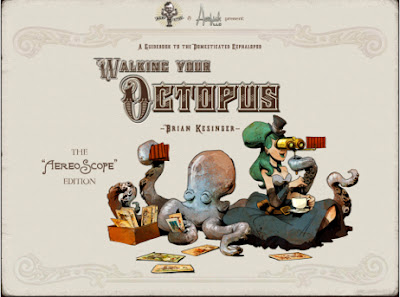 |
| For happy healthy cephalopods, you really need this in your life! |
Forgive my flowery language. Half an hour with this app and you'll feel the necessity to slip into a faux BBC Radio Announcer / Victorian Music-Hall drawl. The superb narration in the app really does rub off on you!
"Walking your Octopus" tells you, in a beautifully illustrated steampunk style, how to keep your pet in tip top condition. After all, looking after an octopus shouldn't be taken lightly - they're not just for Christmas, you know!
With deliciously slick swipe controls and Aerfish's rather lovely presentation (including the patented "AereoScope" panel transition that makes the app really come alive), you're guided through all the great advice you need.
Brian Kesinger, an award winning Disney concept artist (Along with Eric who was the guy responsible for making sure Rapunzel's amazing hair was kept in good order on the film "Tangled") has drawn some truly beautiful illustrations (and he's made me fall completely and hopelessly in love with Victoria Prismall, the book's rather gorgeous Steampunk Octo-Mistress!)
Helen Sadler provides pitch perfect narration and there's a fitting musical piano accompaniment in the app to keep things tinkling along.
Here's a thing though - I don't really think there's anything in here that's too saucy for children (admittedly, Victoria has a rather risque line in clothing and can be seen languishing in the bath in one of the illustrations) but Apple have (perhaps, echoing victorian values) slapped a 12 rating on this for "mild nudity and suggestive themes". So before you zoom off showing this to your children you might want to cast eyes over it first (as I said, I don't think it's got anything they probably wouldn't have seen in your average Bratz cartoon).
This is the sort of e-book that gives us a huge amount of ammo to fire at the argument that e-books and print books can't live alongside each other and reach a happy detente (in fact there is a print version of this book, we're happy to report, and we will most definitely be picking it up as soon as it's released in the UK - lucky Stateside folk may already have it). Slick, intuitive, a real joy to look at and read again and again, "Walking your Octopus" is beautiful, smart and steampunky stuff and we really hope this isn't the last we see of Victoria. She's wonderful!
Walking your Octopus on iPhone
Walking your Octopus on iPad
Monday, 14 January 2013
#readitmummiesanddaddies2013 - Signed Stories Guest Blog Post - a whole new way of storytelling on smart devices.

At Read It Daddy we've taken a look at the innovative 'Signed Stories' app for iPad previously but we thought we'd let the Signed Stories team guest on our blog as part of our #Readitmummiesanddaddies2013 campaign. As more and more parents and children start to use storytelling apps, and the potential for reaching parents who can't read to their kids is realised, apps like this become vital to extending the book world into the technological one.
Over to you, Signed Stories Folk!
 |
| Keith on the Signed Stories App telling the story of 'The Three Little Pigs' |
Mobile devices like the iPad and iPhone are opening up huge opportunities for accessibility and inclusion for children who are so often excluded from fun and important childhood activities.
I probably don’t need to tell readers of this blog how important reading is to children, whether it’s sharing stories and adventures with friends and family, curling up with mum and dad at bedtime or learning words at school.
But what you might not realise is how many deaf children miss out on these experiences because stories are not readily available in sign language, and for many deaf children English is their second language.
Official attainment figures make for grim reading - only a third of deaf children achieve five GCSE grades A-C compared with 60% of hearing children, and poor literacy is a huge factor in this.
iPads are perfect for presenting visual information like sign language - and you can see how amazing our Signed Stories look on the iPad. Although of course they’re amazing on the website too (!) it’s the device that enables us to do so much more with it - the sign language and subtitles can be turned on and off and the subtitles can be customised to make them easier to read. And we’ve extended the stories with two interactive games that reinforce the sign language and a sign language dictionary to help children and adults learn new signs.
But the real inclusion opportunities come because the iPad is a cool device, and using it doesn’t mark children as different.
All the stories on our app are also told with voiceover and with subtitles meaning that all children can use the same app on the same device, creating positive shared experiences within the family and between classmates.
And of course sign language is not just for deaf children. I recently spent time with a five-year-old boy with limited speech because of cerebral palsy and his family, who are just starting to use sign language as a means of communication. I watched him tell his sister he was thirsty - one of the first times in his life, his mum said, that he had initiated communication.
 |
| Peter on the Signed Stories app (we know this face all too well!) |
The Signed Stories app is free to download from the App Store (iPad, iPhone and iPod touch) with one free book ‘Three Billy Goats Gruff’, two interactive games and ten words in the dictionary.
Click here if you’re in the UK: https://itunes.apple.com/gb/app/signed-stories/id550966811?mt=8
Click here if you’re in the USA/Canada: https://itunes.apple.com/us/app/signed-stories/id550966811?mt=8
Tuesday, 27 November 2012
Look out Larry! (iPad App, Wasabi Digital)
Labels:
iPad App,
Larry,
Look out,
Storybook App,
Wasabi Publishing

The lovely folk at Wasabi got in touch with us to tell us all about their storybook apps and as soon as we saw their ethos, we instantly wanted to find out more.
Wasabi sing from the developer song sheet of providing engaging content-rich apps that don't fleece parents for micro-payments but still retain high production values and reasonable prices.
We took a look at "Look out Larry!", a great little story where a lizard tries to get through his adventure-packed day in one piece.
Interaction is the key with Wasabi's story apps, and young readers are encouraged to join in and help Larry escape the various animals in the outback that would like to eat him for lunch, dinner and tea.
Listening to the utterly lovely lilting australian of the lady who reads the story, I could quite happily have listened all day! Charlotte loved helping Larry escape and there's a rather delicious little twist in the story at the end. I'll leave you to find that one out for yourselves.
The app features a match pair game for a bit of extra fun, but it's really all about the story and the great painterly visuals and atmospheric sound production lift this a notch above the ordinary everyday storybook apps that seem to be flooding the app store. We love Larry!
Check out the Wasabi website and the app store for more great preschool apps and stories.
Charlotte's best bit: Poking Larry and listening to him squeak! Poor Larry!
Daddy's favourite bit: That lovely Australian accent, and lovely painted visuals.
(Kindly supplied to us for review by Wasabi Productions)
Monday, 26 November 2012
Sticker Dolly Dressing - Princesses (iPad App - Usborne Publishing)

The iTunes app store is awash with dress-up apps and most of the time these 'free' apps are thinly veiled purchase-driven cash ins that soon frustrate children (and parents) as they realise the majority of the content needs to be paid for separately to get the full benefit.
Thankfully, Usborne's Sticker Dolly Dressing - Princesses app is absolutely packed to the gills with content so once you've paid the app price (£2.99), there's a huge amount to see and do.
Based on Usborne's popular "Sticker Dolly Dressing" range of sticker books, the app version features the same colourful and engaging artwork but of course once your child has finished their creations, they can start all over again.
First, you can select your favourite princess and then pick a scene to include them in. Then you can really go to town dressing the princesses in a vast array of costumes and accessories.
It doesn't end there. Once your princess is suitably dressed for the ball (or any of the other scenes), you can add extra items, characters (including some very cute pets) and decorations into the scene.
Because there's so much content in this, it kept Charlotte occupied for ages and it's quickly become one of the apps she always dives for whenever she's allowed on the iPad. With easy to use drag and drop controls, and (blissfully) no repetitive tinkling music to drive parents absolutely crazy, it's definitely one of the better dress up apps on the market. Some parents might be slightly put off by the £2.99 price tag but for the sheer amount of content and features, it's definitely worth looking at for any princess-obsessed children who just can't get enough of dress-up apps.
Charlotte's best bit: She loves adding items into each scene and tweaking the dress patterns / hair colour
Daddy's favourite bit: Hooray! No repetitive music and chock full of content, unlike a lot of 'free' dress up apps that are just thinly veiled purchase-driven hollow shells.
Friday, 2 November 2012
ABC Pocket Phonics (App Review) by Apps in my Pocket Ltd (Lite version available / £1.99 for full version)
Labels:
ABC Pocket Phonics,
Apps in my Pocket,
iPad App

One of the toughest things about using the iPad and letting Charlotte loose on it is to get her interested in the 'learning' apps as well as playing the games and dress-up things that seem to infest the app store.
We've tried several learning apps, and they usually have a few failings. Sometimes it's very tough to find vocabulary / phonics apps that 1) feature UK versions of words and 2) Have a UK-centric pronunciation of certain words.
What's even tougher is finding phonics apps that do "ah, buh, cuh" rather than "Ay, Bee, Cee".
Thankfully, ABC Pocket Phonics ticks all the right boxes, and breaks down finger tracing / letter drawing exercises with bold and colourful exercise areas, and fun characters and graphics to compliment the phonics and learning stuff.
We've been using the feature-packed 'lite' version for a while for free but thought the app was easily good enough to warrant paying the £1.99 for the full version. As Charlotte is regularly doing letter tracing exercises at school that follow the same format as these, it's a great way of learning and a good parallel to the stuff she's familiar with.
Charlotte's best bit: Word identification and word exercises
Daddy's favourite bit: English accents / pronunciation and phonics that follows the national curriculum phonics progress quite closely.
Links to the iPad versions:
ABC Pocket Phonics (Lite - Free)
ABC Pocket Phonics (Full Version, £1.99)
Links to the iPhone versions:
ABC Pocket Phonics (Lite - Free)
ABC Pocket Phonics (Full Version, £1.49)
Monday, 29 October 2012
TOCA Tailor by Toca Boca (Bonnier Digital) - iPad App
Labels:
Bonnier Digital,
iPad App,
Toca Boca,
TOCA Tailor

One of the things Toca Boca do well is respinning the sort of apps that are extremely common on the app store with the 'Toca Boca' take on things. This usually means high production values and hour after hour of your little ones being totally absorbed in their brightly coloured world.
Toca Tailor is no exception. We've seen a million and one dress-up apps, and most like to ensure that though you get a free app, you pay through the nose for content.
Toca Tailor draws a line neatly through this by having fairly well-defined boundaries, within which you are free to create some of the wildest and whackiest fashion creations for your cute and appealing Toca characters.
First, you start by discretely adjusting the length of your character's dress /shirt and sleeves. Then you can begin to accessorise with a range of hair decorations, jewellery and other goodies. Last but by no means least you can pick through different types of shoes and boots for your character.
So far, so good, it all sounds pretty standard but there's a neat twist to proceedings when you realise that you aren't limited to the built-in patterns on offer here. In fact, with the aid of your iPad (or iPhone) camera, you can sample textures and patterns from the real world.
Quickly grab a pattern with the camera, move it and size it on your character's dress (or sleeves) and then add buttons, clips and all sorts of other little touches to truly make your design stand out (Charlotte drew the line at the game's rather brilliant selection of buttons - she still has that button phobia, even when you're talking about a virtual set!)
Once you've finished creating a fashion masterpiece, you can take a photo of your character AR-style. Place her in your room, next to you, even standing on your shoulder.
Like most of the Toca Boca apps, children can lose themselves for hours in something that is, in essence, a fairly simple core idea given some serious window dressing.
We picked the app up when it was at its introductory price (69p) and Toca Boca stuff can go as high as £2.49 so grab it while you can while it's still cheap.
Charlotte's best bit: Taking photos of her characters 'cuddling' her, and taking a photo of her T Shirt design so her character and her can be "Twins, Identical Twins!"
Daddy's favourite bit: A very slick take on the 'dress up' genre. As great as this is, it does lay down some fairly rigid parameters early on (like most Toca Boca apps seem to) - that said, it does keep Charlotte occupied for ages so a big thumbs up.
Monday, 22 October 2012
Me Books (app) by Me Books Ltd
Labels:
iPad App,
Me Books,
Me Books LTD,
Story Telling App

When we did our round up of book-based apps recently, we were delighted to preview the Me Books app - a fantastic book framework that encourages children to 'be part of the story', taking well known and well loved Ladybird (and other publisher's) books, and encouraging children to add their own speech to the stories and narrations.
The way the app works is quite simple. Each story page has a selection of 'hot spots' on it that can be tapped so that children can either read or speak part of the story themselves, or add lines of dialogue for characters in the illustrations.
The Me Books app comes with a real winner of a free book to get your children started (optional books can be purchased in-app from a marketplace page in the app itself). The classic Ladybird Books version of "Little Red Riding Hood" is one of those books you'll remember from childhood, with the trademark fantastic painted Ladybird Books panels illustrating a well known and well loved tale.
It took us a little bit of fiddling (and a quick watch of the very helpful tutorial video) to work out how to get Me Books to work its magic. Touching the circular 'spot' in the corner of a page spread shows you where the hotspots are (see the image below):
 |
| The touch spot (top right of page) shows the page's hotspots |
Once you've decided which hot spot you want to use, keep your finger on it until it turns red, and you can record snippets of dialogue, silly sound effects or other story-enhancing audio through the iPad (or iPhone's) microphone.
Charlotte spent a lot of time "being" Red Riding Hood (guess who had to play the Wolf! Snarrrrl!) and we had a lot of fun with the app. The only comment I'd make on the User Interface is that doing away with any clear markers or physical controls on the book spreads is fine and dandy, and doesn't distract a child's attention away from the book - but in practice it means that you have nothing visual to tell you if you're recording a piece of speech, when a child should start speaking / making noises etc - and having to hold your finger on a hotspot for the duration of your recording can be a bit of a faff. Also there's no real indication on how long you can record for (children tend to ramble if they're thinking up dialogue on the spot unprompted so some sort of a visual timer would've been cool I think).
In essence, it works well enough but it's something I'd like to see improved on and refined. The hotspot idea is genius though and being able to draw your own on pages means that your books truly can take on a whole new dimension if children want to go into great detail, giving everything on a page a distinct sound or voice.
 |
| This screenshot shows some hotspots. Tap on these to record your own voice and sound effects! |
Once you've finished recording your magnum opus, you can save up to three versions of a book for later retrieval.
Where Me Books would come into its own is with an early reader, and I'd seriously love to see the tech used for early reading books such as the Biff, Chip and Kipper series - or Julia Donaldson's excellent Stage 1 and 2 Phonics books. I can really imagine how brilliant it would be for a child to be able to hear their progress and hear how well they're getting on with the core phonics exercises.
For parents, it's brilliant to be able to grab a book, go through it recordig your own voice and storytelling abilities, for a child to later retrieve and discover. Though there are some utterly brilliant narrators involved in the project (celebrities like Richard E. Grant, Sir David Jason, Tamsin Grieg and Adam Buxton), a child can identify and more easily bond to a story if it's read in a voice they're familiar with (of course there's no substitute for reading to a child directly but if you're not around, they can cuddle up with the iPad and hear your dulcet tones this way instead!)
We trumpeted Me Books as a simple but genius idea, and a lot of children's apps are now realising that one of the best ways of engaging a child's imagination is to let them loose with creating their own content (hey, it works for adults too!)
Go grab the app for free, and see what you think.
Monday, 17 September 2012
TOCA House (app) by Toca Boca / Bonnier Digital (iPad Version Tested)
Labels:
£1.49,
Bonnier Digital,
iPad App,
Toca Boca,
TOCA House

TOCA Boca / Bonnier Digital are our new favourite publisher when it comes to fun and beautifully made iOS distractions. Each and every new TOCA app we install on the iPad is met by squeals of delight, followed by mesmerised immersion by Charlotte who absolutely loves everything they do.
Plumping for TOCA House as our first paid-for TOCA App (You can get TOCA Store, TOCA Doctor, TOCA Hair Salon and TOCA Kitchen Monsters as freebie trials) we knew what to expect. Slick and entertaining graphics and characters, excellent sound design, intuitive controls and a lot of fun.
TOCA House puts you in charge of a rather impressive looking domicile inhabited by 5 fun characters. (We've dubbed them Supergirl, Little Boy, Granny, Miss Houseyhead and Monster-Dude) As any ex-student will know, sharing a house is fun for the first day until it comes to performing all those household chores - and this is pretty much the nub of what TOCA House is about.
Each character shuttles between various locations, all armed and ready to perform the day to day spring cleaning, household chores and gardening that the TOCA house needs to keep it in pristine condition.
SuperGirl is great. She has stretchy limbs and is super-strong, so she's a whizz at hanging pictures on the wall. Boy is a dab-hand with a mop. Granny is a whizz with her broom and Monster - well Monster just seems to like getting messy so takes a lot of baths (yep I definitely shared a house with someone like that, who used up an entire day's worth of hot water every morning noon and night).
TOCA House has lots of little activities to get on with, but repetition does set in rather soon - which is a real shame because in the free TOCA Apps there's plenty to see and do, so you expect to see children get a lot more out of the paid-for versions of things.
That said, Charlotte could've quite happily spent an afternoon doing the same chores over and over again (oh if only this were true of real life) just to see the excellent little animations and the funny noises characters emit whenever they've done a job particularly well.
The app seemed to crash once in a while (needing a cold restart to get things running again on iPad 3) but it's beautifully made and definitely felt like a worthy purchase for the price considering what other kid apps go for on iTunes.
Charlotte's best bit: Bathing the monster chap. Definitely her favourite bit.
Daddy's favourite bit: Slick presentation as ever, and some fun and unique characters in true TOCA Boca stylee!
Thursday, 6 September 2012
Toca Doctor HD Lite by Bonnier Digital - App of the Week

We're relatively new to the app game so apologies if we're raving about things that you've already seen, already enjoyed and have moved on from. The Toca series from Bonnier Digital absolutely sets the benchmark for kid-friendly apps. We've already reviewed their excellent Toca Kitchen Monsters app, and now we're taking a look at the 'lite' version of Toca Doctor HD.
At a piffling 6mb and available for free, Toca Doctor for iPhone and iPad is the sort of app that anyone developing apps for kids needs to take a long hard look at before patting themselves on the back that they've written 'the next Angry Birds'.
From the moment the Toca Boca screen loads (each with a different theme geared around whatever Toca app you're playing), your kids will be bouncing up and down with excitement.
The presentation of these apps is faultless. Superb graphics with a 60s kitsch retro vibe are just the start of the attractive package. Where the Toca apps score really highly is in the sound production and control systems Bonnier Digital use. They obviously rigorously test these apps out on kids so kids don't need to mess around with virtual controls, wade through annoying user interfaces, and pester mum and dad for help every 5 seconds. The Toca range is just that intuitive that kids can get on and enjoy them with the minimum of fuss.
For a 'game' that offers kids the chance to become virtual surgeons and perform all sorts of (sometimes quite icky) operations, Toca Doctor is the 21st century equivalent of ripping out someone's funny bone with a tiny pair of tweezers, playing that hoary old MB Games favourite 'Operation' (which has now changed beyond all recognition and is, to be quite frank, a bit pants now compared to what it used to be like).
Toca Doctor HD Lite gives you a teasing taste of 5 puzzles from a total of 18 available in the full version. A poor kid wraps his bike around a tree and ends up injured, so it's up to you and your miniature doctor buddy to find out what's wrong and perform the necessary surgery to get your patient back to full health.
From top to toe you'll be working on a broken leg, tweaking splinters out of the poor little waif's hands, even giving him a pill to cure his dicky tummy.
As I mentioned before, it's the absolute genius way the developers take full advantage of the iPad (or iPhone's) touch screen to provide really fantastic controls that feel absolutely bang on the nail. I swear to you, you'll be sneaking in to extract those splinters more than once, it just feels so satisfying, like popping bubble wrap.
Though your children will rattle through the lite version fairly quickly, the ever-present lure of the other 13 puzzles will no doubt have you umming and ahhing about the full version price (£2.49 for the iPad, £1.99 for the iPhone). When you consider how much that skinny latte cost you this morning in Starbucks, surely a couple of quid is absolutely nothing compared to the hours of peace and quiet you'll get when you let your kids loose on this.
Toca Doctor HD Lite is available from iTunes for the iPad and iPhone
Charlotte's best bit: Without a doubt, taking those splinters out - oh and the lovely "hello!" you get from the stomach pill too. So cute!
Daddy's favourite bit: It's all so brilliantly slick and so easy to use. Kids from 2 to 102 will be able to play this easily and will love the sights and sounds.
Subscribe to:
Posts (Atom)


 Posts
Posts

